%20Bold.png)
When deciding between cloud-based and on-premise CRM systems, the choice boils down to flexibility versus control. Cloud CRMs are ideal for businesses prioritizing scalability, remote access, and minimal IT involvement. On the other hand, on-premise CRMs cater to organizations that need full control over their data, prefer upfront investments, and operate in highly regulated industries.
| Feature | Cloud CRM | On-Premise CRM |
|---|---|---|
| Cost | Subscription (OpEx) | High upfront (CapEx) |
| Scalability | Instant, pay-as-you-grow | Requires hardware upgrades |
| Setup Time | Days to weeks | Months |
| Accessibility | Internet-based, remote-friendly | Local network, VPN required |
| Security | Vendor-managed, shared responsibility | In-house control |
| Compliance | Vendor certifications (e.g., HIPAA) | Internal management required |
Your choice depends on whether you value convenience and flexibility or prefer control and customization. Keep reading for a detailed breakdown of costs, scalability, security, and compliance.
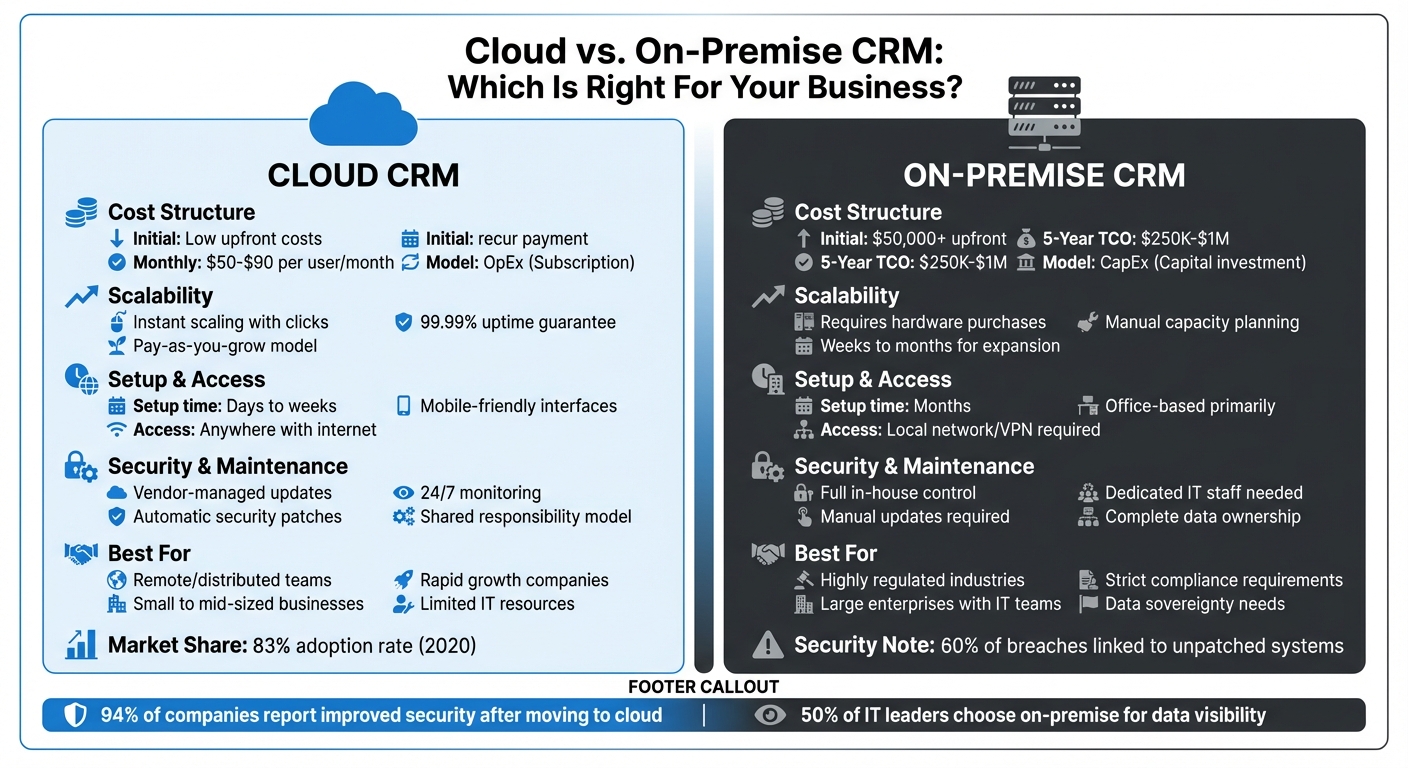
Cloud vs On-Premise CRM: Complete Feature and Cost Comparison
Here's a breakdown of how cloud-based and on-premise CRM solutions measure up across key business factors:
| Feature | Cloud CRM | On-Premise CRM |
|---|---|---|
| Scalability | Easily adjustable with a subscription-based model - just a few clicks away | Requires purchasing and setting up additional physical hardware |
| Initial Costs | Lower upfront costs due to an operating expense (OpEx) model | High initial investment, often ranging from $50,000 to over $500,000 |
| Ongoing Costs | Predictable monthly fees (usually $25–$150 per user) | Additional expenses like IT staff, electricity, cooling, and regular hardware upgrades |
| Security Control | Shared responsibility with vendor-managed infrastructure and 24/7 monitoring | Complete in-house control; your IT team handles all security measures and updates |
| Accessibility | Available from anywhere with internet access, offering mobile-friendly interfaces | Primarily office-based; remote access often requires a VPN |
| Maintenance | Automatic updates handled by the vendor | Manual updates managed by your IT team |
| Compliance | Relies on vendor certifications like SOC 2, ISO 27001, and HIPAA | Requires your organization to maintain internal controls and detailed documentation for audits |
| Implementation Time | Quick setup, often completed in days or weeks | Lengthy process, taking months due to server installations and configurations |
| Customization | Limited to vendor-provided tools or no-code platforms | Highly customizable with direct system access |
| Performance | Internet speed can influence performance, with occasional latency issues | High-speed, low-latency performance on a local network |
These comparisons highlight the operational trade-offs between the two systems. For instance, cloud systems offer convenience and flexibility, while on-premise solutions provide more control and customization.
When it comes to total cost of ownership, on-premise CRM systems can cost between $250,000 and $1 million over five years. This figure includes expenses like IT staffing, hardware upgrades, and compliance audits[6]. Meanwhile, cloud-based systems have grown in popularity, with adoption rates hitting 83% as of 2020[2].
Security is another area where cloud systems often have the upper hand. On-premise setups face challenges with manual updates, which can leave vulnerabilities exposed. In fact, 60% of breaches are linked to unpatched systems. These differences make it clear that the choice between cloud and on-premise CRM solutions depends heavily on your organization's specific needs and priorities.
When it comes to scalability, the contrast between cloud and on-premise CRM systems couldn’t be more striking. Cloud solutions let you adjust resources in a matter of minutes, while on-premise systems can take weeks - or even months - to expand. This distinction becomes critical during periods of rapid growth or seasonal demand spikes.
"Scaling an on-premise environment is a slow and costly process, as it involves purchasing and installing new hardware. In contrast, cloud services offer the key benefit of instant scalability and flexibility." - OVHcloud [8]
Cloud systems not only allow for quick scaling but also provide the flexibility to adjust costs. If business slows, you can reduce your cloud subscription and save money. On the other hand, on-premise systems require a hefty upfront investment, and you’re stuck with those costs regardless of fluctuating demand. Let’s take a closer look at how each type of CRM handles scaling challenges.
Cloud CRM systems are built to scale on demand. Need to add 50 users in a hurry? No problem. With just a few clicks in your admin dashboard, those accounts can be ready in minutes. Many cloud-based CRMs also promise 99.99% uptime [9], ensuring that the infrastructure can handle your growth whenever it happens.
The pay-as-you-grow pricing model aligns expenses with actual usage. This means you can scale up during busy seasons and scale back when things slow down. Cloud CRMs also support remote teams by offering seamless internet access [9][11]. Some companies even use a hybrid strategy called "cloud bursting", where their core applications run on-premise but temporarily tap into public cloud resources during traffic surges [8]. In contrast, on-premise systems struggle to keep pace with such dynamic scaling needs.
Expanding an on-premise CRM is a much more involved process. It requires detailed planning and a significant financial commitment. When you need additional capacity, your IT team has to purchase new servers, install them in your data center, configure the hardware, and integrate it with your existing setup.
The costs don’t stop there. On-premise solutions also demand extra physical space, more power, and enhanced cooling systems. A survey found that 65% of businesses cite the ability to quickly meet changing demands as a key reason for moving to cloud-based systems [13].
"The real hidden cost is the ongoing expense of IT staff needed for constant management, maintenance, and security patching - representing a massive, ongoing investment." - Cloudvara [12]
On-premise systems also lack flexibility when business needs shift. Over-provisioning leaves you paying for resources you don’t use, while under-provisioning can lead to performance problems and a last-minute scramble to add capacity. And scaling down? That’s nearly impossible once the hardware has been purchased [10].
When comparing cloud-based and on-premise CRMs, the financial models they follow are vastly different. Cloud systems operate under an Operational Expenditure (OpEx) model with predictable monthly fees. On the other hand, on-premise solutions require Capital Expenditure (CapEx), involving upfront costs for hardware, software licenses, and installation. These differing approaches significantly impact how businesses budget and plan for their CRM investments.
"At the most basic level, choosing between on premise or cloud-based CRM is a balancing act between cost and control."
– Benjamin Hunting, Oracle [2]
Looking at a five-year total cost of ownership (TCO) provides a clearer picture. While on-premise solutions might appear more economical in the long run, hidden costs - like IT staff salaries, energy consumption, cooling systems, and periodic hardware upgrades - can quickly add up. As of 2020, cloud CRM dominated nearly 83% of the market [2], largely due to businesses favoring the ability to spread costs over time rather than committing large capital upfront. This analysis emphasizes the financial details that emerge over a longer horizon.
To make informed decisions, TCO calculators are invaluable. For cloud CRM, it’s essential to monitor usage patterns closely. Unexpected charges, such as data egress fees (costs for transferring data out of the cloud) and API request costs, can lead to "bill shock" if overlooked [14][15]. For on-premise systems, consider the opportunity cost of IT staff spending time maintaining servers instead of focusing on projects that directly drive revenue [15].
Cloud CRM operates on a subscription model, requiring minimal initial investment. Businesses typically pay $50 to $90 per user per month [2], with these fees covering hosting, maintenance, automatic updates, and security patches. There’s no need to purchase or maintain servers, storage devices, or networking equipment - the vendor handles all infrastructure.
The pay-as-you-grow model makes scaling straightforward. Need to add 10 users this month? Your bill adjusts accordingly. Experiencing a slower period? Costs decrease as you scale back. However, it’s important to keep an eye on recurring charges that might not be immediately obvious. For instance, frequent transfers of large datasets can rack up data egress fees, and some providers charge for API calls or premium storage tiers [14][15].
"Cloud storage is cheaper upfront, but features recurring expenses based on the amount of data, access patterns, and file transfers."
– T.J. Burlee, Secure Data Recovery [14]
Another advantage is the speed of implementation. Cloud CRM can often be up and running within hours or days, compared to the weeks or months required for on-premise solutions. Initial costs usually revolve around data migration from legacy systems and integration with existing tools. Most vendors include onboarding support as part of their subscription, eliminating the need for costly external consultants.
Unlike cloud systems, on-premise CRM requires a significant upfront investment, followed by ongoing maintenance costs.
Deploying an on-premise CRM involves purchasing perpetual software licenses (often thousands of dollars), as well as physical servers, storage arrays, networking equipment (like routers and switches), backup systems, and even industrial cooling solutions. You’ll also need uninterruptible power supplies (UPS) and dedicated data center space.
"In the short term, deploying your company's on-premises infrastructure means you'll have to invest a large amount of capital upfront on hardware, the installation itself, software licensing fees, data backup, extra IT services, support and more."
– Paul Diamond, Product Marketing Manager, Microsoft [1]
Even after setup, costs don’t stop. Ongoing expenses include IT staff salaries, annual maintenance fees (typically 15–20% of the initial license cost), electricity bills, and eventual hardware replacements. Over a five-year period, these cumulative costs often exceed those of cloud CRM systems [15]. However, the trade-off is complete control over your data and infrastructure, with no reliance on internet connectivity or external vendors.
Protecting customer data is no small task, and the risks of getting it wrong are enormous. Just look at Marriott International's experience in 2020. The company faced a $124 million fine from the UK's Information Commissioner's Office after a breach exposed the personal details of 339 million guests [16]. This case is a stark reminder of the financial and reputational damage that can result from CRM security failures. It highlights why choosing the right CRM security approach is so critical - not just for operational stability but also for staying on the right side of regulations.
The key difference between cloud-based and on-premise security lies in who holds the responsibility. With on-premise systems, your organization is in charge of everything - firewalls, encryption, backups, updates - you name it [1].
"Public cloud service workloads will suffer at least 60% fewer security incidents than those in traditional data centers."
– Gartner [1]
For industries like financial services and real estate, compliance adds another layer of complexity. Cloud providers often have dedicated teams focused on securing certifications for regulations like HIPAA, GDPR, and CCPA. This means you can tap into their expertise without having to build it in-house [1]. On the other hand, on-premise solutions require you to hire specialists, monitor systems constantly, and develop incident management protocols from scratch. If something goes wrong, the buck stops with you [1].
The numbers support the growing trust in cloud solutions. Despite initial skepticism about cloud security, 80% of organizations using on-premise servers also rely on the cloud for part of their data protection strategy [1]. Cloud systems typically achieve 99.99% uptime, thanks to automated backups and redundancy across multiple locations [9]. On-premise setups, however, require you to handle off-site backups yourself, increasing the risk of data loss if not managed properly [1][3].
Cloud providers take a layered approach to security. In a cloud CRM setup, security responsibilities are shared: the vendor handles tasks like data encryption (both at rest and in transit), physical protection of data centers, and 24/7 threat monitoring, while your role involves managing user access and internal policies [1][9]. These data centers are no joke - they feature biometric access controls, continuous surveillance, and redundant power systems, all of which would be incredibly costly to replicate on your own.
Automated backups ensure redundancy across geographic zones, so if one data center goes offline, your CRM can seamlessly switch to another location without missing a beat [1][9]. Security patches and updates are also applied automatically, keeping your system protected against emerging threats [3].
When it comes to compliance, cloud vendors often maintain certifications for industry standards. Before committing to a provider, ask to see their compliance certificates or audit reports to ensure they align with your regulatory needs [1]. Adding multi-factor authentication is another simple but effective way to enhance security [9].
For businesses handling sensitive data, data sovereignty is a critical consideration. Knowing where your data is stored and which laws apply is essential. If you're managing sensitive financial or real estate information, conduct a risk assessment to confirm that any overseas storage complies with U.S. privacy and security standards [17]. Many cloud providers now offer options to store data within specific geographic regions.
On-premise systems put you in full control of your security - but that control comes with full responsibility. Your IT team will need to handle everything, from setting up encryption protocols and configuring firewalls to managing access controls and performing manual updates [1].
"If you choose to stay on-premises, you'll be responsible for establishing your own security system - and you bear full responsibility."
– Paul Diamond, Product Marketing Manager, Microsoft [1]
Physical security for on-premise setups is entirely up to you. Servers located in standard office spaces are more vulnerable to risks like theft, fire, water damage, and power outages [1][18]. To mitigate these risks, you may need to invest in uninterruptible power supplies, climate control systems, and off-site backup facilities - expenses that cloud services typically include as part of their package.
Compliance is another major challenge. Meeting standards like GDPR or industry-specific regulations requires hiring experts, monitoring systems, managing access logs, and implementing strict encryption protocols [1]. Unlike cloud providers, which spread these costs across many clients, on-premise solutions place the entire financial burden on your organization.
Interestingly, nearly 50% of IT decision-makers choose on-premise systems because they want direct visibility into where their data is stored. This level of control can help address certain security and compliance concerns [1]. However, it also demands constant vigilance. Unpatched software and human error are common vulnerabilities that cloud providers often mitigate through automation [1].
Before rolling out an on-premise system, audit your existing data to eliminate duplicates and outdated records. This ensures that only critical, high-quality data is protected [11]. You'll also need to establish strong firewalls, implement strict access controls, and develop a reliable off-site backup plan to safeguard against local disasters [1].
When it comes to CRM performance, deployment speed and daily accessibility play a big role, just like cost and scalability. Cloud-based systems shine with their quick setup - often ready to go in just days or weeks, without the hassle of installing physical hardware [5]. On the other hand, on-premise solutions demand much more time, with deployment timelines stretching into months [4].
For businesses with remote teams or offices in multiple locations, accessibility is even more crucial. Cloud CRMs offer internet-based access on any device - whether it’s a laptop at the office, a tablet in the field, or a smartphone on the go [5]. This means your team can view and update real-time data no matter where they are. In contrast, on-premise systems usually tie access to the local network. If remote access is needed, you'll have to set up VPNs, which can be tricky during sudden transitions to remote work and may lead to slower performance [1]. Let’s dive deeper into how cloud and on-premise CRMs differ in setup time and accessibility.
"Knowing that ServiceTitan is cloud-based is great because I don't want all this information on my computer system. I want somebody that's going to manage it for me. And that's what ServiceTitan is for me. It's my IT department."
– Karen Hill, Vice President, HM Plumbing [5]
Cloud CRMs completely remove the need for physical infrastructure. Everything is hosted on the provider’s servers, allowing your team to start using the system almost immediately after signing up [5]. Updates and maintenance? Those happen automatically in the background with zero downtime [5]. This means your team can stay productive without waiting for IT to handle updates or install patches.
Daily operations also benefit from this flexibility. Field agents can update customer records on their phones, office staff can generate reports from their desktops, and managers can check dashboards on their tablets - all in real time [5]. This anywhere access is especially useful for B2B workflows, where teams across departments and locations need to collaborate seamlessly. However, there’s one key dependency: a stable internet connection. If your internet goes down, your access to the CRM goes with it [1]. Before choosing a cloud CRM, ensure your business has a reliable internet connection and consider a backup option for added security.
With on-premise systems, you have full control over the infrastructure - but that control comes at a cost in time and resources. Setting up requires purchasing servers, installing cooling systems and firewalls, and configuring the CRM locally [5]. Depending on your setup’s complexity and hardware availability, this process can take months [4]. You’ll also need a dedicated IT team or external consultants to handle installation and ongoing maintenance [3].
Once operational, these systems come with limitations in daily accessibility. On-premise CRMs are usually tied to the local network, meaning your team has to be in the office - or connected via a VPN - to access the system [5]. This can create bottlenecks for remote or field teams that need real-time data [5]. Updates are another challenge, as they require manual intervention. IT staff must schedule downtime, install patches, and test the system before it’s back online [5]. For businesses running 24/7 operations, this downtime can disrupt workflows and hurt productivity.
That said, on-premise systems do offer a major advantage: direct control over data storage and access. Nearly half of IT decision-makers prefer on-premise solutions because they provide full visibility into where data is stored and who can access it [1]. This level of control is especially important for industries with strict regulations. If your business operates in such environments or has stringent data sovereignty requirements, the control offered by on-premise systems may outweigh their accessibility and setup challenges.
Cloud CRM offers clear advantages for businesses operating in dynamic and fast-paced environments. It’s particularly well-suited for companies that need flexibility, quick implementation, and minimal IT demands. For small or rapidly growing businesses, the cloud model eliminates the need for hefty upfront investments in servers and infrastructure. Instead, you can get started with platforms for around $20–$25 per user per month [19][24]. This approach not only reduces initial costs but also allows businesses to adapt quickly to market shifts while supporting distributed teams.
For remote and distributed teams, the benefits are even more pronounced. If your employees work from home, travel frequently, or are spread across multiple time zones, cloud CRM ensures 24/7 access from any device with an internet connection [19][21]. A great example is 24 Hour Fitness, which migrated its member data to a cloud-based platform in 2018. This shift unified data from nine separate sources, enabling a 40% faster data refresh rate. As a result, the company could deliver personalized pricing and contracts at scale for its 440 clubs and four million members [22]. Such real-time collaboration is simply not feasible with on-premise systems tied to local networks.
Seasonal businesses also stand to gain from cloud CRM’s flexibility. For instance, if your e-commerce store experiences demand surges during the holidays, you can use "cloud bursting" to temporarily scale up resources and pay only for what you use [8]. Once the busy season ends, you can scale back down without being saddled with expensive, underused hardware. This adaptability is invaluable for businesses that need to respond quickly without enduring long procurement processes.
For companies with limited IT resources, cloud CRM is a practical solution. Tasks like maintenance, updates, and security patches are managed by the provider, freeing your team to focus on core business activities. In fact, 94% of companies report improved security after switching to cloud-based systems [23]. The provider handles the infrastructure, so you don’t have to worry about managing servers or troubleshooting hardware issues.
Lastly, if your business wants to tap into AI, machine learning, and real-time analytics, cloud platforms make it easier and faster to integrate these tools compared to on-premise systems [20][21]. For example, companies like Visora offer AI-augmented services that can implement cloud CRM solutions in just 12 weeks, helping B2B leaders deploy advanced capabilities without inflating headcounts or ad budgets. Whether you’re in real estate, financial services, or consulting, cloud CRM provides the flexibility and tools modern teams need to stay ahead in a competitive market.
On-premise CRM systems shine in environments where regulatory compliance and data governance are non-negotiable. For industries like government and healthcare, which handle highly sensitive data, this setup provides unmatched control. By keeping data storage entirely in-house, organizations can bypass the complexities of negotiating external agreements and ensure compliance with strict mandates [4][17][25].
Industries such as financial services and energy also lean toward on-premise CRM for its ability to safeguard sensitive records and infrastructure. As William Goddard explains:
"For enterprise businesses and government organizations looking to retain the greatest possible degrees of data governance and security, on-premise CRM deployment is very much the preferred option" [25].
Another key advantage of on-premise CRM lies in its compatibility with robust in-house IT teams. If your organization already employs skilled IT professionals, they can manage updates, security patches, and physical infrastructure effectively. This not only maximizes their expertise but also allows for complete control over system customization, seamless integration with legacy systems, and flexible update schedules [4][25].
From a financial standpoint, on-premise CRM can be a smart long-term investment for large enterprises. While cloud-based solutions typically charge $50 to $90 per user per month [2][7], organizations with stable operations might find that an upfront investment in on-premise CRM - despite ongoing costs like IT salaries and hardware maintenance - ends up being more economical over time [6][25]. For businesses that prioritize both cost efficiency and high security, this approach is particularly appealing.
Finally, on-premise CRM is indispensable for sectors requiring isolated or air-gapped systems, such as defense and intelligence. Although this model demands rigorous internal security management, it eliminates the risks associated with external connectivity [4][6][25].
Deciding on the right CRM storage model ultimately depends on your priorities around control, cost, and scalability. Each option - whether cloud-based or on-premise - comes with its own set of benefits and trade-offs. Cloud solutions, for example, offer quick deployment and operate on a subscription basis, which eliminates the need for upfront hardware investments. On the other hand, on-premise systems provide full control over your data, predictable long-term costs, and are often better suited for organizations with dedicated IT teams and strict compliance needs.
Different industries often have unique requirements that influence this decision. For instance, leaders in financial services must navigate regulatory frameworks like GDPR and CCPA, where data transparency and residency are critical. Real estate professionals, on the other hand, might prioritize mobile accessibility to update records while in the field. Meanwhile, SaaS companies often lean toward cloud infrastructure to ensure smooth integration with other cloud-native tools. These examples emphasize the importance of aligning your CRM storage choice with your specific business needs and operational goals.
"Public cloud is no more or less secured than on-premise. The reason is that security is about people, and people on both sides can make mistakes and compromise security." – Michael Dell, Founder of Dell Technologies [7]
This quote underscores a key point: many cloud security issues arise from implementation errors, with research suggesting that 99% of such issues through 2025 will stem from these mistakes [7].
For businesses seeking expert guidance, Visora (https://visora.co) specializes in deploying advanced CRM systems tailored to industries like investment firms, commercial real estate, and financial services. By combining strategic CRM implementation with AI-powered business development, Visora helps clients enhance deal flow and accelerate sales cycles. Whether you require the flexibility of cloud solutions or the control of on-premise systems, a well-executed CRM strategy can transform your platform into a competitive advantage rather than just a data management tool.
The CRM industry itself is growing rapidly, with projections estimating a market size of $113.5 billion by 2027 [9]. As of 2020, cloud-based options already accounted for 80% of all CRM sales [7]. However, choosing the right storage model isn’t about following market trends - it’s about selecting a solution that aligns with your operational needs, compliance requirements, and long-term business goals.
When deciding between cloud-based and on-premise CRM systems, businesses need to weigh factors like cost, scalability, maintenance, and customization. Each option comes with its own set of advantages and challenges, so understanding these can help you make a more informed choice.
Cloud CRMs tend to have lower upfront costs since they operate on a subscription model. On the other hand, on-premise solutions require a larger initial investment in hardware and software, which can be a barrier for some businesses.
In terms of scalability, cloud systems are much more flexible. They allow businesses to quickly adjust storage capacity or user access without much hassle. In contrast, scaling an on-premise system often means purchasing additional hardware and going through time-consuming configurations, which can strain both time and resources.
Maintenance is another key consideration. With cloud solutions, the service provider takes care of updates, backups, and security measures, freeing up your internal resources. On-premise systems, however, place the responsibility squarely on your in-house IT team, requiring ongoing monitoring and management.
Finally, think about your security and compliance requirements. On-premise systems give you full control over your data and allow for more extensive customization, which can be critical for industries with strict regulatory obligations. Meanwhile, cloud systems excel in providing remote access and seamless integration with other tools, making them a strong choice for businesses with distributed teams.
If you're still unsure, Visora’s AI-enabled growth platform can help you navigate these factors and pinpoint the CRM solution that best matches your goals, budget, and operational needs.
With cloud-based CRM systems, the service provider takes care of most of the heavy lifting when it comes to infrastructure-level security. This includes tasks like protecting servers, ensuring network security, and maintaining physical data center safeguards. They also typically handle platform updates, manage firewalls, and perform basic system hardening. However, your organization still has key responsibilities, such as securing the application layer, managing user access, encrypting sensitive data, and enforcing your internal security policies.
In contrast, on-premise CRM systems shift the entire security burden onto your organization. Your team is responsible for everything - from safeguarding physical servers and updating operating systems to handling network segmentation, intrusion detection, and backup management. While this setup gives you complete control over your environment, it also means your team is fully accountable for any security breaches or compliance failures.
To put it simply, cloud-based systems use a shared responsibility model, where security tasks are split between you and the provider. On the other hand, on-premise solutions require your team to manage every single aspect of security on its own.
The cost dynamics of cloud-based and on-premise CRM solutions vary significantly when analyzed over a five-year period.
Cloud-based CRM operates on a subscription model, typically charged per user each month. This approach keeps upfront costs low, as most expenses fall under operational expenditure (OpEx). The subscription fee usually covers hosting, updates, backups, and basic support, meaning there's no need to invest in hardware or dedicate significant resources to IT maintenance. Costs scale predictably with the number of users and additional features, making financial planning more manageable.
In contrast, on-premise CRM demands a substantial initial outlay for software licenses, servers, and other hardware, which is categorized as capital expenditure (CapEx). Beyond the upfront costs, businesses face ongoing expenses for maintenance, hardware upgrades, security measures, and IT staff salaries. While these recurring costs are classified as OpEx, they can become substantial over time, particularly as systems scale or equipment needs replacement.
To sum up, cloud-based CRM provides a subscription-based model with lower upfront costs and predictable expenses, while on-premise CRM requires a heavier initial investment and ongoing maintenance, which can drive up total costs in the long run. Companies like Visora can assist in evaluating these options and implementing the right solution tailored to your business needs and budget.
%20(5).png)
