%20Bold.png)
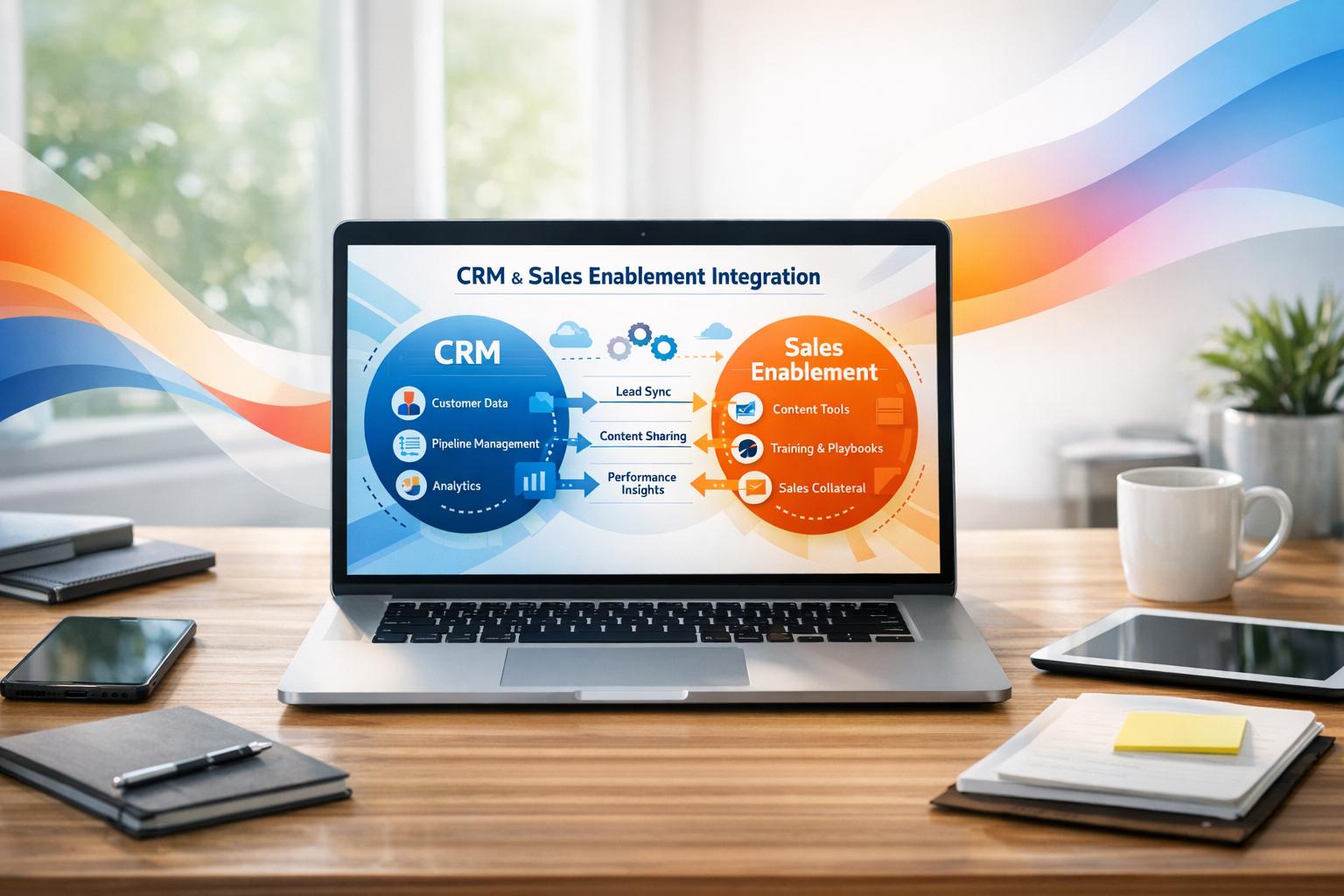
Want to streamline your sales process and close more deals? Integrating your CRM with sales enablement tools is the key. It connects your CRM’s prospect data with tools for content, training, and coaching - giving your team tailored recommendations directly within the CRM. Here’s why it matters:
This guide covers everything from benefits and setup to advanced AI features and tracking results. Ready to transform your sales strategy? Let’s dive in.
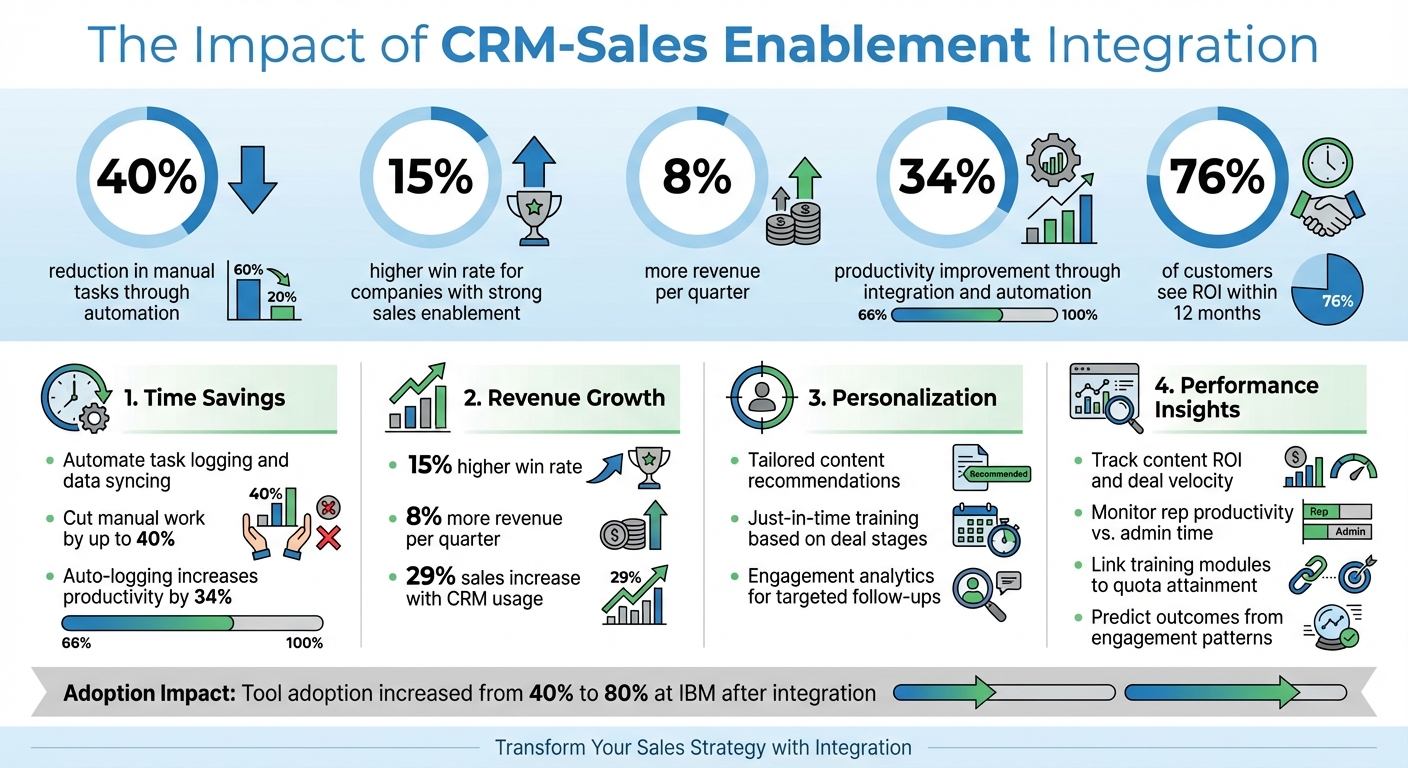
CRM-Sales Enablement Integration Benefits and Impact Statistics
Linking your CRM with a sales enablement platform creates a powerful synergy that boosts productivity, strengthens buyer relationships, and provides clearer insights into what drives success. These advantages translate into more closed deals and increased revenue per sales rep.
Sales teams often waste valuable hours on administrative duties - logging calls, updating notes, and hunting for the right materials. Integrating your CRM with a sales enablement platform streamlines these processes by automatically syncing interactions like calls, emails, and content shares directly into the CRM[1].
Imagine this: when a deal progresses to the negotiation stage, the system automatically suggests relevant playbooks within the CRM interface[2][6]. No more switching between tabs or asking managers where to find resources. Everything reps need is at their fingertips.
The stats speak for themselves. Automated CRM systems can reduce manual tasks by up to 40%[3], while integration and automation improve productivity by 34% by freeing reps from admin work[1]. Highspot reports that 76% of their customers see a return on investment within 12 months of integrating their enablement platform with CRM[6].
"Time freed up from administrative tasks is better spent selling - look for a sales enablement platform that will save your reps time and help maintain CRM data hygiene by automatically logging all activities." - Highspot Team[6]
Automation also ensures CRM data stays accurate, which improves forecasting and gives a clearer view of pipeline health[6]. This efficiency ultimately leads to more meaningful interactions with buyers.
Today’s buyers expect tailored, relevant interactions. Integration enables this by combining CRM data about a prospect with content recommendations from your enablement platform. When reps access a deal record, they see a complete history of conversations and engagements. The system then recommends specific case studies, whitepapers, or demo videos that align with the buyer’s industry, challenges, and stage in the sales process[2][6].
It doesn’t stop there. Integration also supports just-in-time training. For example, when a deal moves from discovery to proposal, the system can launch a short training module to help the rep address common objections or technical questions[2][6].
Engagement analytics add another layer of value. When a rep shares a proposal, the system tracks how the buyer interacts with it - like which slides they linger on - allowing for more targeted and meaningful follow-ups.
"The recommended content and just-in-time training ensures that sellers are equipped to provide buyers with tailored, personalized content that uplevels the experience." - Highspot[6]
Integration also transforms how sales performance is tracked. By linking enablement activity data with CRM revenue data, businesses gain a clear view of what drives results. When all sales activities are automatically logged, managers and leaders benefit from a single source of truth for rep performance and pipeline health[1]. This transparency makes it easier to identify which reps are sticking to the process, where deals are stalling, and where coaching can make a difference.
The real game-changer is influenced revenue tracking. By connecting closed-won data with enablement engagement metrics, you can pinpoint which assets - like case studies or demo videos - are linked to successful deals[6]. This insight helps prioritize effective content while phasing out underperforming materials.
| Metric Type | What Integration Reveals |
|---|---|
| Content ROI | Shows which assets contribute to closed-won deals versus lost opportunities. |
| Deal Velocity | Highlights where deals slow down and which activities speed them up. |
| Rep Productivity | Tracks actual selling time compared to time spent on administrative tasks. |
| Training Impact | Links specific training modules to quota attainment. |
| Buyer Intent | Predicts deal outcomes based on content engagement patterns. |
Joshua Artzy-McCendie, a seller at IBM, has seen these benefits in action after integrating Salesloft with their CRM. Tool adoption soared from 40% to 80%, and visibility improved across the board:
"Salesloft automates that process so I can see who's engaged with an account and work with other sellers to avoid doubling up." - Joshua Artzy-McCendie, Seller, IBM[5]
This level of insight not only empowers individual reps but also helps organizations refine their sales strategies by replicating what works best across teams.
Before linking your CRM with sales enablement tools, you need to focus on three key areas: technical setup, team alignment, and security protocols. Addressing these upfront helps avoid delays and ensures the integration delivers real value from the start. These steps lay the groundwork for a smooth process that boosts both technology and team performance.
First, make sure the systems are compatible. Using APIs effectively is critical for smooth integration. A helpful approach is to structure APIs into three tiers:
Avoid relying on custom-coded solutions to force systems to work together. These can create major headaches when updates roll around. Instead, opt for pre-built integration platforms with connectors that work across both cloud-based and on-premise systems.
Another vital step? Clean up your data. A reliable CRM is essential for AI-driven tools like forecasting and personalized content recommendations. Take time to remove duplicate records, standardize field formats, and verify contact details. High-quality data is the foundation for accurate insights and effective tools. Did you know that the average business uses nearly 1,000 different applications, but only 28% of them are integrated? Meanwhile, 81% of IT leaders say data silos block their digital transformation efforts [7].
Here’s an example: GPC Real Estate switched from manual spreadsheets to an automated HubSpot CRM system. This change cut manual work by 40% and allowed them to scale operations without adding more staff [3].
Getting everyone on the same page is just as important as the technical side. Involve key players early - sales reps, managers, RevOps, marketing, and IT. When teams help choose the tools, they’re much more likely to use them effectively.
Breaking down departmental silos is crucial. When sales, marketing, customer service, and IT all work from a unified platform, they can base their strategies on shared, accurate data. This not only streamlines daily tasks but also strengthens cross-functional collaboration. Take Cambridge Sound Management, for example. After adopting an integrated CRM strategy, their teams saw major improvements in working together. As Meghann Ellis, the company’s Controller, put it:
"We are capturing a lot of data we didn't have before, and we can slide our data every which way. We're a lot more efficient and can target our audience better" [8].
Once the technical and team aspects are in place, focus on protecting your system with strong security measures. Data security should be a top priority from the start. Every CRM provider has its own security guidelines - review these carefully before syncing your systems [9].
Set up access controls and permissions to safeguard sensitive information, especially when enabling features like activity writeback or ROI reporting. Accurate data mapping between your CRM and sales enablement tools is also key to avoiding sync errors or security gaps. Use validation tools to clean up outdated contacts, which helps with compliance. And if you’re adding AI tools, make sure the data they rely on is accurate and reliable [7].
Once you've tackled technical compatibility, team alignment, and security protocols, it's time to dive into the integration process. This involves four key steps that build upon one another. While each step demands careful attention, the results are worth it - companies with effective sales enablement programs report a 15% higher win rate [1].
Start by assessing your existing CRM system and identifying productivity bottlenecks. Are your sales reps wasting time hunting for content? Is manual data entry eating up hours that could be spent closing deals? Pinpointing these pain points will guide your choice of tools.
Involve your sales reps, managers, and RevOps leaders early in the process. Their input ensures that the tools you select address real challenges, which boosts adoption rates. As IBM's Joshua Artzy-McCendie noted:
"Salesloft automates that process so I can see who's engaged with an account and work with other sellers to avoid doubling up" [5].
It's worth noting that top-performing sales teams use nearly three times as much sales technology as their underperforming counterparts [1]. Once you've identified your needs, you're ready to map your data and set up automation.
Next, align data fields between your CRM and the enablement platform. Enable auto-logging to keep everything synchronized in real time and eliminate the need for manual updates. Automation can significantly boost efficiency - auto-logging calls, emails, and notes has been shown to increase productivity by 34% [1].
Make sure data flows seamlessly in both directions. For instance, engagement analytics from your enablement tool should feed into the CRM, while CRM data should trigger content recommendations tailored to specific opportunities. Choosing tools that integrate directly into your CRM's interface can also minimize platform switching, helping your reps stay focused.
A great example is Oracle's "One Oracle" strategy in 2025. By integrating Seismic with its CRM, Oracle enabled global teams to access and share consistent messaging without leaving their workflow. This streamlined operations across regions and improved efficiency [2].
AI features can take your integration to the next level. Configure real-time coaching tools to provide feedback during calls and analyze messaging trends for actionable insights. These tools help reps fine-tune their approach in the moment.
Set up "next-best action" recommendations based on deal stages. This ensures your team has instant access to relevant playbooks, training materials, and compliant content exactly when they need it. This type of contextual enablement equips your reps with the right resources at the right time.
CRMs alone can increase sales by 29% [1], but layering on AI-powered tools can amplify this impact. Once you've optimized these features, move on to testing to ensure everything aligns smoothly.
Before rolling out the integration to your entire team, start with a pilot program involving a small group of high-performing reps. Monitor the data flow closely and identify any issues with automation rules or data mapping. This controlled testing phase helps iron out any kinks before a full launch.
Once the integration is running smoothly, expand it to the rest of the team. Training should be an ongoing effort - schedule regular sessions to demonstrate features like real-time coaching. Track adoption rates, engagement metrics, and pipeline health post-launch to measure success. For instance, CoherentAI aligned its CRM with a strategy-led outbound campaign system and generated over $150,000 in new pipeline during a single campaign cycle [3].
| Integration Step | Key Action | Expected Outcome |
|---|---|---|
| Data Mapping | Align CRM fields with enablement content tags | Relevant content recommendations based on deal stage |
| Automation Setup | Enable auto-logging for calls and emails | 34% higher productivity; reduced manual entry [1] |
| AI Optimization | Configure real-time coaching and alerts | Enhanced rep performance during live interactions |
| Testing/Launch | Conduct sandbox testing and pilot programs | Consistent data sync and higher user adoption |
Though the integration process requires upfront effort, these steps can lead to measurable gains in productivity and revenue.
Once your integration is complete, it’s time to take things up a notch by adding advanced features that create a smarter, more responsive sales system. Building on earlier integration steps, these methods can significantly improve your sales team’s agility and efficiency.
AI-driven personalization takes prospect engagement to the next level by customizing content based on both the sales rep's preferences and the buyer's profile. Instead of manually hunting for the perfect case study or proposal template, AI uses CRM data to recommend the most relevant materials for each stage of the deal. For example, a rep working with a financial services executive might receive entirely different content suggestions than one pitching to a real estate syndicate leader.
But it doesn’t stop there. Predictive AI goes a step further, identifying the "next-best actions" based on engagement signals. By analyzing when prospects open emails, download resources, or visit your website, the system suggests the best time to follow up. This kind of real-time guidance ensures reps always have the right playbook or coaching tool at their fingertips - all within their CRM workflow [4][7].
Notably, high-performing sales teams are nearly three times more likely to leverage sales technology compared to underperforming teams. AI-powered personalization is becoming a key factor in their success [1].
Real-time analytics and coaching tools provide instant, actionable feedback during live sales calls. These tools analyze metrics like talk time, sentiment, and objection patterns while the conversation is happening, offering guidance that reps can apply immediately to improve outcomes. This shifts coaching from after-the-fact reviews to real-time support.
Embedding these tools directly into your CRM workflow eliminates the hassle of switching between platforms, which significantly boosts adoption rates. IBM demonstrated this in 2025 when sales leader Amanda Mikesell-Carrera tackled integration issues and introduced workflow-specific training. As a result, tool adoption soared from 40% to 80%. Sellers like Joshua Artzy-McCendie used the system to automate engagement tracking seamlessly. Mikesell-Carrera explained:
"We fixed integration issues and gave sellers the right training to make the tool fit into their day-to-day work" [5].
Additionally, features like automated activity capture ensure that all calls, emails, and interactions are logged without adding extra administrative work. This provides managers with accurate performance insights while allowing reps to stay focused on selling. Together, these tools can increase productivity by 34% [1].
Integrating email, phone, LinkedIn, and other collaboration tools with your CRM creates a centralized communication hub. This eliminates the need for manual data entry and ensures consistent messaging across every interaction with buyers. Multi-channel cadence automation can even trigger follow-ups based on buyer behavior. For instance, if a prospect opens an email but doesn’t reply, the system might schedule a LinkedIn message or a phone call as the next step.
The benefits of this kind of integration are clear. For example, one firm streamlined investor management by automating workflows, drastically cutting down on manual tasks [3]. Similarly, CoherentAI generated over $150,000 in pipeline by aligning their demand targeting with an outbound infrastructure that directly connected to their CRM [3].
| Feature | Integration Benefit |
|---|---|
| Auto-logging | Ensures accurate forecasting with a single source of truth [1] |
| Cadence Automation | Maintains personalized outreach at scale across email and phone [1] |
| Conversation Intelligence | Refines messaging and training directly in the CRM [1] |
| Content Recommendations | Surfaces tailored assets based on opportunity details [4] |
By reducing the number of tools reps need to juggle, this integration approach helps them stay focused and effective, all while improving tool adoption.
For B2B leaders aiming to maximize their CRM and sales enablement integration, Visora’s Trifecta Program offers a comprehensive solution. This program ties together outbound campaigns, social media presence, lead targeting, and CRM into a unified conversion engine. It builds on earlier integration steps by combining strategic execution with advanced sales techniques, centered around three key elements: the B2B Vortex Funnel for multi-channel engagement, AI-augmented appointment setting to handle top-of-funnel tasks, and in-depth strategy consulting to align systems with revenue objectives.
Visora specializes in industries like real estate syndication, investor relations, commercial real estate, and financial services, where decision-makers expect highly personalized outreach. Their AI-driven systems boast over 98% accuracy in qualifying opportunities and have cut deal cycles by more than half [3]. With over $70 million in pipeline generated across 30+ partners, their engagements typically see an average pipeline increase of $150,000.
What makes Visora stand out? Their ability to deliver enterprise-level expertise at startup speed. Led by founder Danny Kim - who previously spearheaded growth at Deloitte for companies like Meta, Disney, and Amazon - the team implements fully integrated acquisition systems in just 12 weeks. This approach doesn’t require additional headcount or ad spend but focuses on creating proprietary deal flow through intent signals and multi-channel touchpoints, all seamlessly coordinated within advanced CRM systems.
For companies transitioning away from manual processes or looking to refine existing integrations, Visora offers hands-on support to ensure smooth and effective system alignment from day one. As a partner from Pinnacle Realty shared:
"The Visora team is fast, reliable, and high-quality" [3].
These advanced methods create a strong foundation for ongoing improvements and measurable success.
Getting your CRM and sales enablement tools to work together is just the beginning. The real challenge lies in tracking what’s driving results and refining your strategy based on solid data.
To measure success, you need KPIs that turn raw data into actionable insights. These metrics should clearly show how your integration impacts revenue growth. For example:
As Alex Walton from Sales Enablement Collective explains:
"KPIs tie raw data back to business goals, giving you an objective sense of what's working" [10].
But here’s the catch: nearly 49% of sales enablement teams and leadership disagree on which metrics matter most [10]. That’s why it’s crucial to automate data collection from your CRM and content management systems to minimize reporting errors. Set clear benchmarks and look for patterns, such as improved win rates when using targeted content. You can also track metrics like "time to first sale" for new hires to see how quickly your tech stack helps them ramp up [10].
KPIs are just the start. To keep improving, you need to connect the data from your tools with real-world feedback from your team. For instance, content engagement analytics can show which sales materials are most effective at closing deals, while conversation intelligence can uncover recurring buyer objections or gaps in messaging. By analyzing this information, you can fine-tune your approach and boost efficiency [8].
Regular check-ins with your team can also help identify any friction points. For example, CoherentAI used this method in 2024 to align their targeting with an integrated outbound campaign, resulting in over $150,000 in new pipeline [3]. The key is to create a continuous feedback loop: collect data, analyze it, adjust your workflows, and repeat. This cycle ensures your workflows stay aligned with your overall business goals.
Bringing together CRM and sales enablement creates a powerful system that helps your revenue team work smarter and achieve more. A well-synced CRM and sales enablement platform doesn’t just simplify processes - it fuels growth. By cutting down on administrative tasks, it allows your sales team to focus on what truly matters: building relationships and closing deals. This integration leads to higher win rates, better productivity, and increased sales performance [1].
The foundation for success lies in clean data, team alignment, and a commitment to ongoing improvement using feedback and key performance indicators (KPIs). But the real game-changer comes when you go beyond basic integration. Leveraging AI-driven personalization, real-time coaching, and seamless multi-channel communication within one system can take your operations to the next level.
For U.S.-based B2B leaders in industries like real estate, financial services, and professional services, the stakes are particularly high. If your business generates over $3 million in annual revenue and you’re looking to scale without depending solely on referrals or expanding your team unnecessarily, expertise becomes critical. Visora’s Trifecta Framework has proven results - shortening deal cycles by over 50% and achieving a 98%+ qualification rate. With more than $127.15 million added to the pipeline, it turns your CRM into a true revenue-driving tool [3].
The next step is clear: implement swiftly and turn your CRM into a cornerstone of your business strategy. Whether you’re just starting or revamping your current tools, a well-planned integration strategy can enhance efficiency, boost revenue, and give you a competitive edge.
Ready to take the leap? Discover how Visora can craft a custom integration system tailored to your goals and start connecting with decision-makers in as little as 7–14 days.
Integrating CRM systems with sales enablement tools brings a host of advantages to businesses. For starters, it ramps up sales team productivity by automating tedious tasks like data entry, freeing up sellers to concentrate on what they do best - closing deals. Plus, this integration ensures that sales reps have access to the right content exactly when they need it, making interactions with prospects more meaningful.
The numbers speak for themselves: companies often see win rates climb by as much as 15%, along with quicker deal closures. It also encourages broader CRM adoption by making the platform easier to use and more impactful for teams. On top of that, it helps cut down on marketing and conversion expenses. In short, integrating these tools simplifies workflows, sharpens decision-making, and ultimately boosts revenue.
AI transforms the way CRM and sales enablement tools work together, turning raw customer data into meaningful insights and automating tedious tasks. By analyzing interaction history, buying intent, and social signals, AI can recommend personalized content, suggest the next best actions, and even rank leads based on how likely they are to convert. It also keeps CRM systems tidy by automatically logging emails, updating records, and syncing pipeline stages - cutting down on manual data entry.
When AI is built directly into CRM platforms, businesses can scale personalized outreach, simplify the transition from marketing to sales, and boost overall productivity. Features like AI-powered lead scoring, real-time analytics, and automated follow-ups allow sales teams to focus on what matters most: engaging with the right prospects. This creates a smooth, data-driven process that helps teams reach the right buyers at the perfect time with the ideal message.
To make your CRM and sales enablement integration as seamless as possible, start by setting clear business objectives. These might include goals like enhancing pipeline visibility, shortening the sales cycle, or boosting customer retention rates. Once your goals are defined, take a close look at your current tools and systems to determine which ones need to integrate with your CRM. Address any data silos that might hinder the process.
Before migrating, clean and organize your data. This step involves removing duplicates, aligning fields, and ensuring the data is accurate and consistent. When selecting a CRM, opt for one that meets your integration requirements, whether that’s through APIs, middleware, or pre-built connectors. Create a detailed migration plan, complete with timelines and backup procedures, to keep the process on track.
Before launching, conduct thorough testing. This ensures that syncing, analytics, and sales enablement features function as intended. Post-launch, the focus should shift to training your team and encouraging system adoption to fully capitalize on the integration’s potential.
Additionally, implement real-time dashboards to monitor key metrics and establish governance policies for data entry and access. Keep an eye on the system regularly, addressing any issues that arise and fine-tuning workflows as needed to ensure the integration continues to align with your business goals.
%20(5).png)
